

TheDocumentation Index
Fetch the complete documentation index at: https://mintlify-mintlify-contextual-display-1773267894.mintlify.app/llms.txt
Use this file to discover all available pages before exploring further.
docs.json file lets you turn a collection of Markdown files into a navigable, customized documentation site. This required configuration file controls styling, navigation, integrations, and more. Think of it as the blueprint for your documentation.
Settings in docs.json apply globally to all pages.
Setting up your docs.json
To get started, you only need to specify theme, name, colors.primary, and navigation. Other fields are optional and you can add them as your documentation needs grow.
For the best editing experience, include the schema reference at the top of your docs.json file. This enables autocomplete, validation, and helpful tooltips in most code editors:
{
  "$schema": "https://mintlify.com/docs.json",
  "theme": "mint",
  "name": "Your Docs",
  "colors": {
    "primary": "#ff0000"
  },
  "navigation": {
    // Your navigation structure
  }
  // The rest of your configuration
}
Reference
This section contains the full reference for thedocs.json file.
Customization
mint, maple, palm, willow, linden, almond, aspen, sequoia, luma.See Themes for more information.Show Colors
Show Colors
#.#.#.Show Logo
Show Logo
/logo.png/logo-dark.pnghttps://mintlify.com/favicon.pngShow Thumbnails
Show Thumbnails
colors field.Show Fonts
Show Fonts
Show Styling
Show Styling
section to show the section name or breadcrumbs to show the full navigation path. Defaults to section.- Set to
trueto force-load LaTeX stylesheets when automatic detection fails to recognize your mathematical expressions. - Set to
falseto prevent loading LaTeX stylesheets for improved performance if you don’t use mathematical expressions but have content that triggers false-positive detection.
"system".Simple configuration:"system": Match current site mode (light or dark)"dark": Always use dark mode
- Use a string to specify a single Shiki theme for all code blocks
- Use an object to specify separate Shiki themes for light and dark modes
"styling": {
  "codeblocks": {
    "theme": "dracula"
  }
}
Show languages
Show languages
"styling": {
  "codeblocks": {
    "languages": {
      "custom": ["/languages/my-custom-language.json"]
    }
  }
}
Show Icons
Show Icons
fontawesome.You can only use one icon library for your project. All icon names in your documentation must come from the same library.Show Fonts
Show Fonts
- URL to a hosted font, such as https://mintlify-assets.b-cdn.net/fonts/Hubot-Sans.woff2.
- Path to a local font file, such as
/fonts/Hubot-Sans.woff2.
family name, so no source URL is needed.source field.Show Heading
Show Heading
- URL to a hosted font, such as https://mintlify-assets.b-cdn.net/fonts/Hubot-Sans.woff2.
- Path to a local font file, such as
/fonts/Hubot-Sans.woff2.
family name, so no source URL is needed.source field.Show Body
Show Body
- URL to a hosted font, such as https://mintlify-assets.b-cdn.net/fonts/Hubot-Sans.woff2.
- Path to a local font file, such as
/fonts/Hubot-Sans.woff2.
family name, so no source URL is needed.source field.Show Background
Show Background
{{variableName}} syntax.Show Variables
Show Variables
Structure
Show Navbar
Show Navbar
Show Links
Show Links
github to link to a GitHub repository and display the repository’s star count. Set to discord to link to a Discord server and display the number of online users in the server.type is not set. Optional for github and discord types. When omitted, the label is automatically populated from API data (repository name for GitHub and server name for Discord).github type, must be a GitHub repository URL. For discord type, must be a Discord invite URL.- Font Awesome icon name, if you have the
icons.libraryproperty set tofontawesomein yourdocs.json - Lucide icon name, if you have the
icons.libraryproperty set tolucidein yourdocs.json - Tabler icon name, if you have the
icons.libraryproperty set totablerin yourdocs.json - URL to an externally hosted icon
- Path to an icon file in your project
- SVG code wrapped in curly braces
- Convert your SVG using the SVGR converter.
- Paste your SVG code into the SVG input field.
- Copy the complete
<svg>...</svg>element from the JSX output field. - Wrap the JSX-compatible SVG code in curly braces:
icon={<svg ...> ... </svg>}. - Adjust
heightandwidthas needed.
regular, solid, light, thin, sharp-solid, duotone, brands.Show Primary
Show Primary
button for a standard button with a label, github for a link to a GitHub repository with live star count, or discord for a Discord server invite with live online user count.type is button. Optional for github and discord types—when omitted, the label is automatically populated from API data (repository name for GitHub, server name for Discord).type is github, must be a GitHub repository URL. If type is discord, must be a Discord invite URL.Show Navigation
Show Navigation
Show Global
Show Global
Show Languages
Show Languages
Show Tabs
Show Tabs
- Font Awesome icon name, if you have the
icons.libraryproperty set tofontawesomein yourdocs.json - Lucide icon name, if you have the
icons.libraryproperty set tolucidein yourdocs.json - Tabler icon name, if you have the
icons.libraryproperty set totablerin yourdocs.json - URL to an externally hosted icon
- Path to an icon file in your project
- SVG code wrapped in curly braces
- Convert your SVG using the SVGR converter.
- Paste your SVG code into the SVG input field.
- Copy the complete
<svg>...</svg>element from the JSX output field. - Wrap the JSX-compatible SVG code in curly braces:
icon={<svg ...> ... </svg>}. - Adjust
heightandwidthas needed.
regular, solid, light, thin, sharp-solid, duotone, brands.Show Anchors
Show Anchors
- Font Awesome icon name, if you have the
icons.libraryproperty set tofontawesomein yourdocs.json - Lucide icon name, if you have the
icons.libraryproperty set tolucidein yourdocs.json - Tabler icon name, if you have the
icons.libraryproperty set totablerin yourdocs.json - URL to an externally hosted icon
- Path to an icon file in your project
- SVG code wrapped in curly braces
- Convert your SVG using the SVGR converter.
- Paste your SVG code into the SVG input field.
- Copy the complete
<svg>...</svg>element from the JSX output field. - Wrap the JSX-compatible SVG code in curly braces:
icon={<svg ...> ... </svg>}. - Adjust
heightandwidthas needed.
regular, solid, light, thin, sharp-solid, duotone, brands.Show Dropdowns
Show Dropdowns
- Font Awesome icon name, if you have the
icons.libraryproperty set tofontawesomein yourdocs.json - Lucide icon name, if you have the
icons.libraryproperty set tolucidein yourdocs.json - Tabler icon name, if you have the
icons.libraryproperty set totablerin yourdocs.json - URL to an externally hosted icon
- Path to an icon file in your project
- SVG code wrapped in curly braces
- Convert your SVG using the SVGR converter.
- Paste your SVG code into the SVG input field.
- Copy the complete
<svg>...</svg>element from the JSX output field. - Wrap the JSX-compatible SVG code in curly braces:
icon={<svg ...> ... </svg>}. - Adjust
heightandwidthas needed.
regular, solid, light, thin, sharp-solid, duotone, brands.Show Products
Show Products
- Font Awesome icon name, if you have the
icons.libraryproperty set tofontawesomein yourdocs.json - Lucide icon name, if you have the
icons.libraryproperty set tolucidein yourdocs.json - Tabler icon name, if you have the
icons.libraryproperty set totablerin yourdocs.json - URL to an externally hosted icon
- Path to an icon file in your project
- SVG code wrapped in curly braces
- Convert your SVG using the SVGR converter.
- Paste your SVG code into the SVG input field.
- Copy the complete
<svg>...</svg>element from the JSX output field. - Wrap the JSX-compatible SVG code in curly braces:
icon={<svg ...> ... </svg>}. - Adjust
heightandwidthas needed.
regular, solid, light, thin, sharp-solid, duotone, brands.banner, footer, and navbar configurations in addition to the navigation structure.Show Languages
Show Languages
Show Interaction
Show Interaction
true to force navigation to the first page when a navigation group expands. Set to false to prevent navigation and only expand or collapse the group. Leave unset to use the theme’s default behavior.Show Footer
Show Footer
{
  "x": "https://x.com/mintlify"
}
x, website, facebook, youtube, discord, slack, github, linkedin, instagram, hacker-news, medium, telegram, twitter, x-twitter, earth-americas, bluesky, threads, reddit, podcastShow Banner
Show Banner
{
  "content": "🚀 Banner is live! [Learn more](mintlify.com)"
}
false.Show Contextual
Show Contextual
assistant: Open the AI assistant with the current page as context.copy: Copy the current page as Markdown to the clipboard.view: View the current page as Markdown in a new tab.chatgpt: Send the current page content to ChatGPT.claude: Send the current page content to Claude.perplexity: Send the current page content to Perplexity.grok: Send the current page content to Grok.mcp: Copies your MCP server URL to the clipboard.add-mcp: Adds your MCP server to the user’s configuration.cursor: Installs your hosted MCP server in Cursor.vscode: Installs your hosted MCP server in VSCode.
Show Custom option
Show Custom option
base and optional query parameters.Placeholder values:$page: Current page content$path: Current page path$mcp: MCP server URL
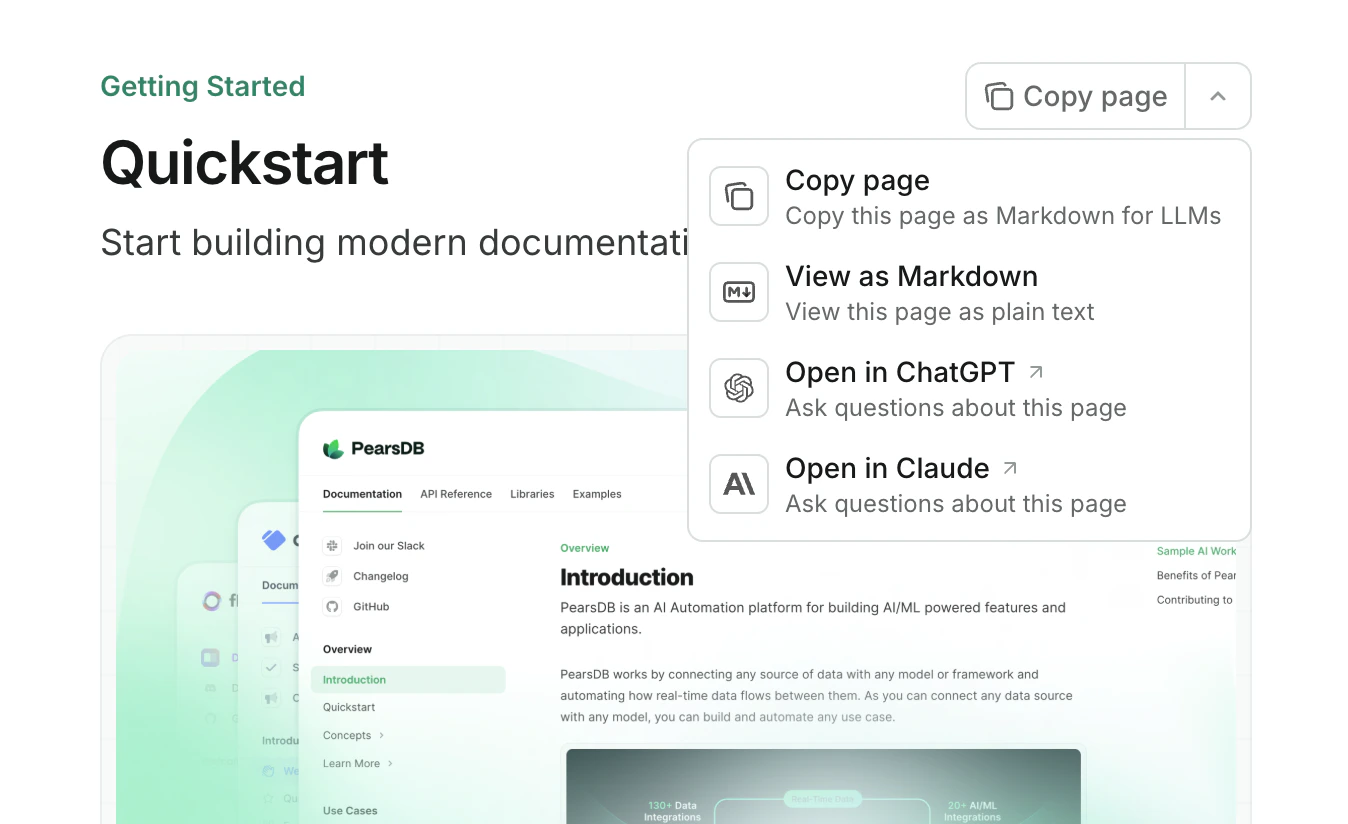
header to show them in the top-of-page context menu or toc to show them in the table of contents sidebar. Defaults to header.API configurations
Show api
Show api
Show openapi
Show openapi
"openapi": "openapi.json"
Show asyncapi
Show asyncapi
"asyncapi": "asyncapi.json"
Show Params
Show Params
closed.full to always show the full base URL on every endpoint page. By default, the base URL is only shown when there are multiple base URLs to select from.Show Examples
Show Examples
all.false.true. When set to false, only manually written code samples (from x-codeSamples in OpenAPI specifications or <RequestExample> components in MDX) appear in the API playground.Show Spec
Show Spec
false.Show Mdx
Show Mdx
api frontmatter fields. Not used when the frontmatter contains a full URL.SEO and search
Show Seo
Show Seo
navigable to index only pages that are in your docs.json navigation or choose all to index every page. Defaults to navigable.Show Search
Show Search
Integrations
Show Integrations
Show Integrations
Show Adobe
Show Adobe
Show Amplitude
Show Amplitude
Show Clarity
Show Clarity
Show Clearbit
Show Clearbit
Show Frontchat
Show Frontchat
Show Ga4
Show Ga4
Show Gtm
Show Gtm
Show Intercom
Show Intercom
Show Mixpanel
Show Mixpanel
Show Telemetry
Show Telemetry
false, feedback features are also disabled and do not appear on your documentation pages.Errors
Show Errors
Show Errors
Show 404
Show 404
true.Examples
- Basic example
- Interactive API example
- Multi-language example
{
  "$schema": "https://mintlify.com/docs.json",
  "theme": "maple",
  "name": "Example Co.",
  "description": "Example Co. is a company that provides example content and placeholder text.",
  "colors": {
    "primary": "#3B82F6",
    "light": "#F8FAFC",
    "dark": "#0F172A"
  },
  "navigation": {
    "dropdowns": [
      {
        "dropdown": "Documentation",
        "icon": "book",
        "description": "How to use the Example Co. product",
        "groups": [
          {
            "group": "Getting started",
            "pages": [
              "index",
              "quickstart"
            ]
          },
          {
            "group": "Customization",
            "pages": [
              "settings",
              "users",
              "features"
            ]
          },
          {
            "group": "Billing",
            "pages": [
              "billing/overview",
              "billing/payments",
              "billing/subscriptions"
            ]
          }
        ]
      },
      {
        "dropdown": "Changelog",
        "icon": "history",
        "description": "Updates and changes",
        "pages": [
          "changelog"
        ]
      }
    ]
  },
  "logo": {
    "light": "/logo-light.svg",
    "dark": "/logo-dark.svg",
    "href": "https://example.com"
  },
  "navbar": {
    "links": [
      {
        "type": "github",
        "href": "https://github.com/example/repo"
      },
      {
        "type": "discord",
        "href": "https://discord.gg/example"
      },
      {
        "label": "Community",
        "href": "https://example.com/community"
      }
    ],
    "primary": {
      "type": "button",
      "label": "Get Started",
      "href": "https://example.com/start"
    }
  },
  "footer": {
    "socials": {
      "x": "https://x.com/example",
      "linkedin": "https://www.linkedin.com/company/example",
      "github": "https://github.com/example",
      "slack": "https://example.com/community"
    },
    "links": [
      {
        "header": "Resources",
        "items": [
          {
            "label": "Customers",
            "href": "https://example.com/customers"
          },
          {
            "label": "Enterprise",
            "href": "https://example.com/enterprise"
          },
          {
            "label": "Request Preview",
            "href": "https://example.com/preview"
          }
        ]
      },
      {
        "header": "Company",
        "items": [
          {
            "label": "Careers",
            "href": "https://example.com/careers"
          },
          {
            "label": "Blog",
            "href": "https://example.com/blog"
          },
          {
            "label": "Privacy Policy",
            "href": "https://example.com/legal/privacy"
          }
        ]
      }
    ]
  },
  "integrations": {
    "ga4": {
      "measurementId": "G-XXXXXXXXXX"
    },
    "telemetry": {
      "enabled": true
    },
    "cookies": {
      "key": "example_cookie_key",
      "value": "example_cookie_value"
    }
  },
  "variables": {
    "version": "2.0.0",
    "api-url": "https://api.example.com"
  },
  "contextual": {
    "options": [
      "copy",
      "view",
      "chatgpt",
      "claude"
    ]
  },
  "errors": {
    "404": {
      "redirect": false,
      "title": "I can't be found",
      "description": "What ever **happened** to this _page_?"
    }
  }
}
{
  "$schema": "https://mintlify.com/docs.json",
  "theme": "maple",
  "name": "Example Co.",
  "description": "Example Co. is a company that provides example content and placeholder text.",
  "colors": {
    "primary": "#3B82F6",
    "light": "#F8FAFC",
    "dark": "#0F172A"
  },
  "navigation": {
    "dropdowns": [
      {
        "dropdown": "Documentation",
        "icon": "book",
        "description": "How to use the Example Co. product",
        "groups": [
          {
            "group": "Getting started",
            "pages": [
              "index",
              "quickstart"
            ]
          },
          {
            "group": "Customization",
            "pages": [
              "settings",
              "users",
              "features"
            ]
          },
          {
            "group": "Billing",
            "pages": [
              "billing/overview",
              "billing/payments",
              "billing/subscriptions"
            ]
          }
        ]
      },
      {
        "dropdown": "API reference",
        "icon": "terminal",
        "description": "How to use the Example Co. API",
        "groups": [
          {
            "group": "API reference",
            "pages": [
              "api-reference/introduction"
            ]
          },
          {
            "group": "Endpoints",
            "openapi": {
              "source": "openapi.json"
            }
          }
        ]
      },
      {
        "dropdown": "Changelog",
        "icon": "history",
        "description": "Updates and changes",
        "pages": [
          "changelog"
        ]
      }
    ]
  },
  "api": {
    "playground": {
      "display": "interactive"
    },
    "url": "full",
    "examples": {
      "languages": ["javascript", "curl", "python"]
    }
  },
  "logo": {
    "light": "/logo-light.svg",
    "dark": "/logo-dark.svg",
    "href": "https://example.com"
  },
  "navbar": {
    "links": [
      {
        "type": "github",
        "href": "https://github.com/example/repo"
      },
      {
        "label": "Community",
        "href": "https://example.com/community"
      }
    ],
    "primary": {
      "type": "github",
      "href": "https://github.com/example/repo"
    }
  },
  "footer": {
    "socials": {
      "x": "https://x.com/example",
      "linkedin": "https://www.linkedin.com/company/example",
      "github": "https://github.com/example",
      "slack": "https://example.com/community"
    },
    "links": [
      {
        "header": "Resources",
        "items": [
          {
            "label": "Customers",
            "href": "https://example.com/customers"
          },
          {
            "label": "Enterprise",
            "href": "https://example.com/enterprise"
          },
          {
            "label": "Request Preview",
            "href": "https://example.com/preview"
          }
        ]
      },
      {
        "header": "Company",
        "items": [
          {
            "label": "Careers",
            "href": "https://example.com/careers"
          },
          {
            "label": "Blog",
            "href": "https://example.com/blog"
          },
          {
            "label": "Privacy Policy",
            "href": "https://example.com/legal/privacy"
          }
        ]
      }
    ]
  },
  "integrations": {
    "ga4": {
      "measurementId": "G-XXXXXXXXXX"
    },
    "telemetry": {
      "enabled": true
    },
    "cookies": {
      "key": "example_cookie_key",
      "value": "example_cookie_value"
    }
  },
  "variables": {
    "version": "2.0.0",
    "api-url": "https://api.example.com"
  },
  "contextual": {
    "options": [
      "copy",
      "view",
      "chatgpt",
      "claude"
    ]
  },
  "errors": {
    "404": {
      "redirect": false,
      "title": "I can't be found",
      "description": "What ever **happened** to this _page_?"
    }
  }
}
{
  "$schema": "https://mintlify.com/docs.json",
  "theme": "maple",
  "name": "Example Co.",
  "description": "Example Co. is a company that provides example content and placeholder text.",
  "colors": {
    "primary": "#3B82F6",
    "light": "#F8FAFC",
    "dark": "#0F172A"
  },
  "navigation": {
    "global": {
      "anchors": [
        {
          "anchor": "Documentation",
          "href": "https://mintlify.com/docs"
        },
        {
          "anchor": "Changelog",
          "href": "https://mintlify.com/docs/changelog"
        }
      ]
    },
    "languages": [
      {
        "language": "en",
        "dropdowns": [
          {
            "dropdown": "Documentation",
            "icon": "book",
            "description": "How to use the Example Co. product",
            "pages": [
              {
                "group": "Getting started",
                "pages": ["index", "quickstart"]
              },
              {
                "group": "Customization",
                "pages": ["settings", "users", "features"]
              },
              {
                "group": "Billing",
                "pages": [
                  "billing/overview",
                  "billing/payments",
                  "billing/subscriptions"
                ]
              }
            ]
          },
          {
            "dropdown": "Changelog",
            "icon": "history",
            "description": "Updates and changes",
            "pages": ["changelog"]
          }
        ]
      },
      {
        "language": "es",
        "dropdowns": [
          {
            "dropdown": "Documentación",
            "icon": "book",
            "description": "Cómo usar el producto de Example Co.",
            "pages": [
              {
                "group": "Comenzando",
                "pages": ["es/index", "es/quickstart"]
              },
              {
                "group": "Personalización",
                "pages": ["es/settings", "es/users", "es/features"]
              },
              {
                "group": "Billing",
                "pages": [
                  "es/billing/overview",
                  "es/billing/payments",
                  "es/billing/subscriptions"
                ]
              }
            ]
          },
          {
            "dropdown": "Changelog",
            "icon": "history",
            "description": "Actualizaciones y cambios",
            "pages": ["es/changelog"]
          }
        ]
      }
    ]
  },
  "logo": {
    "light": "/logo-light.svg",
    "dark": "/logo-dark.svg",
    "href": "https://example.com"
  },
  "navbar": {
    "links": [
      {
        "label": "Community",
        "href": "https://example.com/community"
      }
    ],
    "primary": {
      "type": "button",
      "label": "Get Started",
      "href": "https://example.com/start"
    }
  },
  "footer": {
    "socials": {
      "x": "https://x.com/example",
      "linkedin": "https://www.linkedin.com/company/example",
      "github": "https://github.com/example",
      "slack": "https://example.com/community"
    },
    "links": [
      {
        "header": "Resources",
        "items": [
          {
            "label": "Customers",
            "href": "https://example.com/customers"
          },
          {
            "label": "Enterprise",
            "href": "https://example.com/enterprise"
          },
          {
            "label": "Request Preview",
            "href": "https://example.com/preview"
          }
        ]
      },
      {
        "header": "Company",
        "items": [
          {
            "label": "Careers",
            "href": "https://example.com/careers"
          },
          {
            "label": "Blog",
            "href": "https://example.com/blog"
          },
          {
            "label": "Privacy Policy",
            "href": "https://example.com/legal/privacy"
          }
        ]
      }
    ]
  },
  "integrations": {
    "ga4": {
      "measurementId": "G-XXXXXXXXXX"
    },
    "telemetry": {
      "enabled": true
    },
    "cookies": {
      "key": "example_cookie_key",
      "value": "example_cookie_value"
    }
  },
  "variables": {
    "version": "2.0.0",
    "api-url": "https://api.example.com"
  },
  "contextual": {
    "options": ["copy", "view", "chatgpt", "claude"]
  },
  "errors": {
    "404": {
      "redirect": false,
      "title": "I can't be found",
      "description": "What ever **happened** to this _page_?"
    }
  }
}
Upgrading from mint.json
If your docs project uses the deprecated mint.json file, follow these steps to upgrade to docs.json.
Install or update the CLI
npm i -g mint
mint update
Create your docs.json file
mint upgrade
docs.json file from your existing mint.json. Review the generated file to ensure all settings are correct.